
Building Scalable React Applications
Building scalable React applications requires careful planning and adherence to best practices. In this post, we'll explore key patterns and techniques that will help you build maintainable applications.
Component Architecture
One of the most important aspects of building scalable React apps is having a well-thought-out component architecture. Here are some key principles:
1. Component Composition
Break down your UI into small, reusable components. Each component should have a single responsibility and be easy to understand.
// Good: Small, focused components
const UserProfile = ({ user }) => (
  <div>
    <Avatar src={user.avatar} />
    <UserInfo name={user.name} email={user.email} />
    <UserStats posts={user.posts} followers={user.followers} />
  </div>
);
2. Container vs Presentational Components
Separate your business logic from presentation logic:
- Container Components: Handle data fetching, state management, and business logic
- Presentational Components: Focus solely on rendering UI
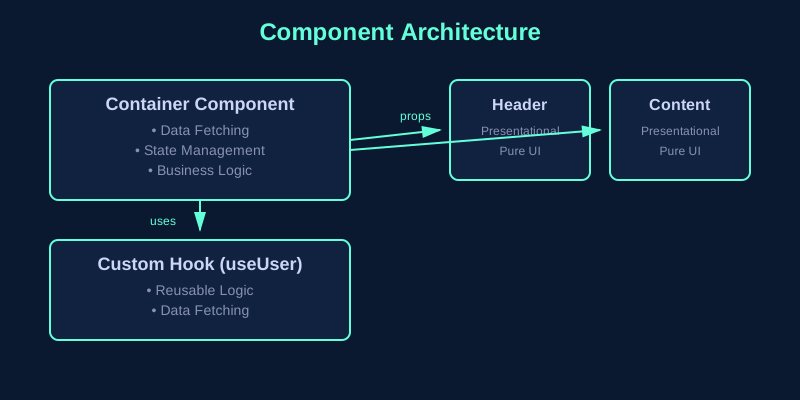
The diagram above illustrates how container components manage state and pass data to presentational components, while custom hooks encapsulate reusable logic.
3. Custom Hooks
Extract reusable logic into custom hooks:
const useUser = userId => {
  const [user, setUser] = useState(null);
  const [loading, setLoading] = useState(true);

  useEffect(() => {
    fetchUser(userId).then(data => {
      setUser(data);
      setLoading(false);
    });
  }, [userId]);

  return { user, loading };
};
State Management
Choose the right state management solution based on your needs:
- Local State: Use
useStatefor component-specific state - Context API: Good for theme, authentication, and global UI state
- Redux/Zustand: Better for complex applications with lots of shared state
Performance Optimization
Memoization
Use React.memo, useMemo, and useCallback to prevent unnecessary re-renders:
const ExpensiveComponent = React.memo(({ data }) => {
  const processedData = useMemo(() => {
    return expensiveOperation(data);
  }, [data]);

  return <div>{processedData}</div>;
});
Code Splitting
Lazy load components that aren't immediately needed:
const Dashboard = React.lazy(() => import('./Dashboard'));

function App() {
  return (
    <Suspense fallback={<Loading />}>
      <Dashboard />
    </Suspense>
  );
}
Testing
Write tests for your components:
- Unit tests for individual components
- Integration tests for component interactions
- End-to-end tests for critical user flows
Conclusion
Building scalable React applications is about making smart architectural decisions early on. By following these patterns and best practices, you'll create applications that are easier to maintain, test, and extend over time.
Remember: premature optimization is the root of all evil. Start simple, measure performance, and optimize where it matters most.